


.png)
One of the first decisions every business faces when building a website is choosing between a custom design and a ready-made template. Both approaches have serious supporters, both can be the right choice in the right situation, and both can impose hidden costs on a business in the wrong one. Instead of giving one definitive answer for everyone, this article looks at the real decision criteria so you can make a more informed choice based on your own business.
What is custom design?
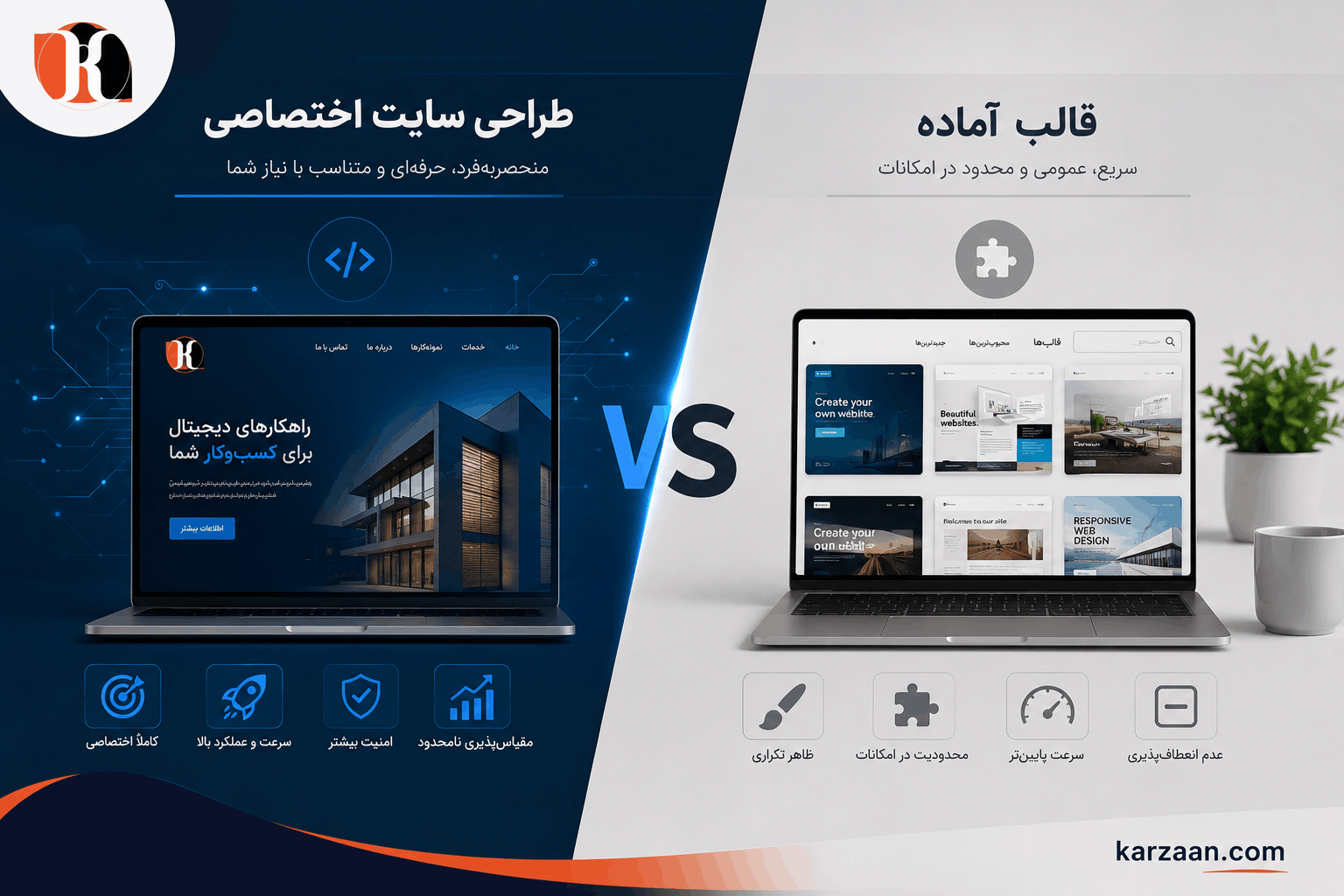
In a custom design, the user interface and technical structure of the site are designed and coded from scratch, based exactly on your brand identity, your users’ needs and your business goals. There is no pre-built template: everything starts with wireframes and ends with a custom technical build. As we explained in our guide to corporate website design costs (in Persian), this approach usually costs more up front but brings significant benefits in the long run.
What is a ready-made template?
Ready-made templates are pre-designed visual layouts that usually run on content management systems such as WordPress, Webflow or Shopify. You buy or download the template, change the colors and fonts, add your logo and content, and the site is ready to publish.
Overall comparison
Criterion |
Custom design |
Ready-made template |
|---|---|---|
Initial cost | Higher | Lower |
Time to launch | Slower | Faster |
Visual distinctiveness | Complete | Limited (the same template as thousands of other sites) |
Customization | Unlimited | Limited to the template’s structure |
Performance and speed | Usually better optimized | Depends on the template’s quality and the number of plugins |
Security | Full control | Depends on template and plugin updates |
Technical SEO | Optimized from the start | Depends on the quality of the template’s code |
Best for | Brands that prioritize distinctiveness and long-term growth | A quick start on a limited budget |
Advantages of custom design
1. Complete differentiation from competitors
When you use a template, the same template may be used by thousands of other sites, including your competitors. A custom design guarantees that your site reflects exactly your brand identity, not a generic template with a few colors changed.
2. Precise optimization for your target user
In a custom design, the user flow is designed precisely for your target audience’s behavior and needs, not for a hypothetical, generic user. This directly affects how many visitors become customers.
3. Better performance and speed
Templates usually ship with CSS, JavaScript and features you never use, but which still weigh the site down. A custom site contains only the code you actually need.
4. Stronger security
Because they are so widely used, popular WordPress themes are a more common target for cyberattacks. A custom site with a unique code structure is less exposed.
5. Unlimited scalability
As your business grows, you may need features a template can’t support. On a custom site, anything can be added, from a user panel to integration with your organization’s internal systems such as a CRM or LMS.
6. Technical SEO from the ground up
The code structure, speed, heading hierarchy and information architecture of a custom site can be fully optimized from day one. This matters especially for businesses that publish a lot of content, such as specialist blogs.
Advantages of a ready-made template
1. Speed of launch
If you urgently need an online presence for business reasons (such as an event or a campaign), a template can be ready within days.
2. Lower initial cost
For new businesses or startups that haven’t yet proven their business model, starting with a professional template can make more sense than a heavy investment in custom design.
3. A rich plugin ecosystem
Platforms like WordPress have a large ecosystem of plugins that provide many common features (contact forms, chat, SEO, image optimization and more) without custom coding.
4. Easier management for non-technical users
If you want to manage the site’s content yourself without a technical team, content management systems like WordPress offer a simpler interface for it.
Common mistakes when choosing
Choosing a template for a major brand
When a brand with a strong visual identity and a professional audience uses a generic template, its credibility suffers, even if the content is excellent.
Choosing a custom design for a trial project
If you’re not yet sure a business idea works, a heavy investment in custom design may be premature.
Forgetting template maintenance costs
Templates, especially on WordPress, need regular updates (the theme, the plugins and WordPress core). Ignoring these updates leaves the site open to security vulnerabilities.
Assuming a template is always cheaper
If your needs go beyond what a standard template offers and you need a developer to customize it, the final cost can exceed even a fairly simple custom design, without giving you the same result.
Deciding factors: which approach suits you better?
Consider a custom design if:
- Your brand operates in a competitive market and visual distinctiveness matters to you
- You need specific features that templates don’t support (such as integration with a CRM, an ERP or an LMS (in Persian) learning system)
- The site is meant to play a central role in your customer acquisition strategy
- Fast loading is critical for you (for example, a high-traffic online store)
- You plan to add advanced features in the long run
Consider a ready-made template if:
- You’re at the proof-of-concept stage and want to get to market quickly
- Your budget is limited and your design needs are standard
- Non-technical people need to manage the content, and the template alone can handle that
- Your field has less visual competition and content is the main priority
A hybrid approach: start with a template, move to custom
A smart strategy that many successful businesses use is:
1. Phase one: a quick launch with a professional template, to enter the market fast and prove the concept
2. Phase two: once the business model is proven and the site’s real needs are clearer, a custom design built on a much better understanding of how real users behave
This approach both lowers the risk of the initial investment and uses real user experience to optimize the final design.
The role of SEO in this decision
We stress this separately because its effect is long-term: a site’s technical structure directly affects its ability to rank on Google.
Low-quality templates usually have duplicate code, an incorrect heading structure, slow speed caused by extra JavaScript and CSS, and poor mobile compatibility, all factors Google takes into account when ranking. If content and SEO matter to your business (and they should), choosing the right technical foundation from the start costs less than a later redesign to fix technical problems.
Quick decision checklist
Before making your final choice, ask yourself these questions:
- Do I need a fast launch (under a month)? → A template has the advantage
- Is visual distinctiveness from competitors critical for me? → Custom design
- Do I need integration with other systems (CRM, ERP, LMS)? → Custom design
- Is my business model still taking shape? → Starting with a template makes more sense
- Does the site play a central role in generating leads and customers? → Investing in a custom design is justified
- Do I publish a lot of content, and does SEO matter to me? → A strong (custom) technical foundation comes first
How this decision connects to your organization’s other digital systems
One important point that is often overlooked: your corporate website doesn’t work in isolation. If your organization later needs other systems such as an enterprise LMS (in Persian), a mobile app (in Persian) or a customer portal, the technical architecture you choose for the site today can make those future integrations easy or hard. A custom site with well-defined APIs is much easier to integrate with other enterprise systems later than a WordPress site built on a ready-made theme.
How the platform affects day-to-day content management
A practical aspect that is often forgotten is how easy or hard managing the site day to day will be. When you need to publish a blog post, add a new service page or swap a temporary promotional banner, does that need a developer, or can you do it yourself?
On WordPress templates, the content management system (CMS) is usually simpler and more usable for non-technical users. On custom sites, the experience can vary a lot depending on the admin panel the development team has built. So before finalizing your choice, decide who will manage the site’s content day to day and whether the proposed admin panel matches that person’s technical level.
When does a template become a headache?
Experience shows that templates usually start causing problems in these situations:
- When the organization wants to add a page with a layout completely different from the template’s structure. Custom CSS may make it possible, but it often means adding awkward code
- When the template or one of the plugins it depends on is updated and the update conflicts with earlier customizations
- When the number of installed plugins passes a certain point and the site slows down dramatically
- When the template’s maker stops supporting it and its security vulnerabilities stay unpatched
Does WordPress always mean a ready-made template?
Not necessarily. WordPress is a content management system, and a custom theme can be built on it too. Some design teams build a custom theme on WordPress so clients get both the benefits of a familiar CMS (simple content management) and a fully custom visual design.
This hybrid approach can be attractive for organizations that want to manage content easily but also care about visual distinctiveness. It costs more than buying a template, but less than a fully custom site.
The role of brand identity in this decision
If your organization doesn’t yet have a defined visual identity (its own colors, typography and visual style), a professional template can shape that identity for you. That is a double-edged sword, though: your brand identity may end up defined by the limits of a pre-built template instead of growing out of your business’s core values.
If the organization has an established brand identity, templates often can’t reflect it properly because of their structural limits. In that case, custom design is the better tool for translating the brand identity into a unique digital experience.
Comparing the total cost of ownership (TCO)
When you compare the two approaches financially, the initial cost isn’t enough. You need to consider the total cost of ownership over four to five years:
For a ready-made template:
- The cost of the template (one-off or subscription)
- The cost of initial setup by a designer
- The cost of the plugins you need (often yearly subscriptions)
- Update and maintenance costs
- Developer costs for technical problems or customizations outside the template’s structure
- The possible cost of a redesign when the template’s limits block growth
For a custom design:
- The initial design and development cost (higher)
- Yearly support costs
- The cost of adding new features (usually done in the same codebase)
- Hosting costs (usually similar or comparable to WordPress)
In many cases, when you run this calculation over three to five years, the cost gap between the two approaches is smaller than it first appears, especially if the site grows and needs more complex customization.
Summary
There is no single answer to the question “Is custom design better, or a ready-made template?”, because the decision depends on your business’s priorities, growth stage and specific needs. If speed to market and lower initial risk matter more, start with a professional template. If brand distinctiveness, high performance and long-term growth come first, investing in a custom design from the start is justified. The Karzaan team has experience with both approaches and can recommend the right path based on your business’s real situation.